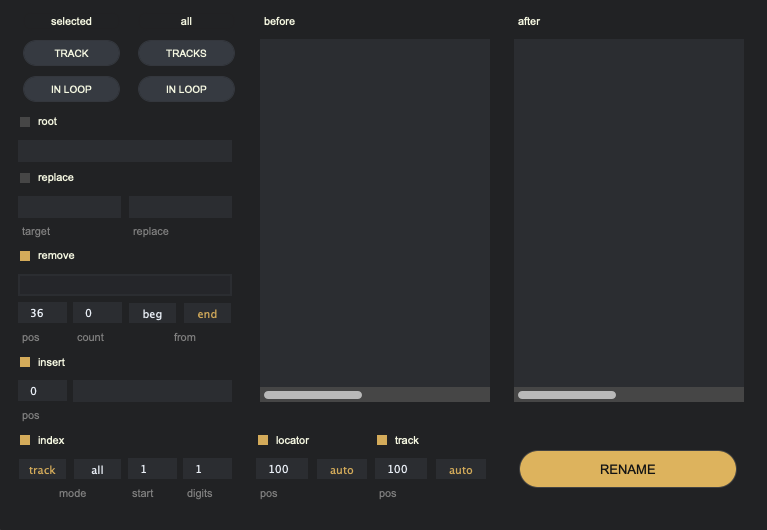
1. What It Is
Renamer is a batch clip-renaming device for Ableton Live Arrangement View. Its goal is not to export audio, but to capture a clear set of arrangement clips during the editing stage, preview the naming result through rules, and then write the final names back into the Live Set in one pass.
2. How Capture Works
Renamer first creates a fixed set of clips to rename. It supports two track scopes only: the currently selected track, or all tracks. Each scope can optionally use the current loop range, which creates four fixed capture entries. Normal TRACK / TRACKS capture ignores the loop, while the two IN LOOP modes only include clips that overlap the current loop range.
3. What You Can Control
Renamer currently lets you control these naming rules: root, replace, remove, insert, locator, track, and index. You can capture first, enable or adjust rules one by one, and watch the result through the before / after preview. Names are only written back to Live after you press RENAME.
4. What Preview Means
before shows the original names recorded at capture time, and after shows the target names produced by the active rules. They are not two separate sets of objects; they are a before-and-after view of the same captured clips. Rule changes, loop changes, locator names, and track names can refresh the preview, but if the target clip set itself changes, such as adding, deleting, moving clips, or switching to another track set, you must capture again.
5. Known Boundaries
Renamer does not support free matrix-style multi-track selection. IN LOOP modes require a valid loop in the current Live Set. If replace is enabled but target is empty, it has no practical effect. If locator is enabled but no matching locator segment exists inside the loop, the result may not be what you expect. If the target range changes after capture, changing rules alone will not update the current rename targets; capture again.
6. Status Feedback
Renamer does not have a separate colored status strip like Exporter. Its feedback is mainly delivered through device output messages, such as capture success, no matching target clips, unavailable loop, no active rules, or how many clips were renamed. These messages tell you whether the current action succeeded and whether you need to check the loop, track range, or rule state first.