1. What It Is
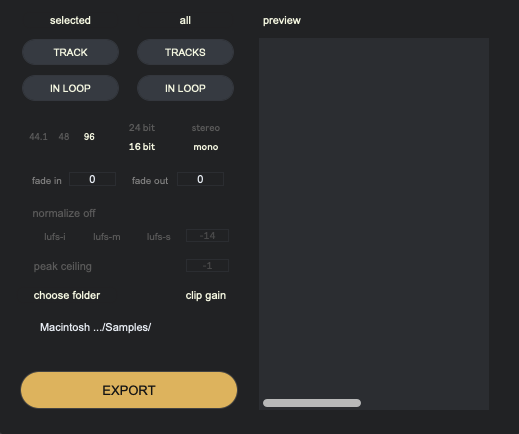
Exporter is a batch clip-export device for Ableton Live Arrangement View. It does not freely combine arbitrary track selections. Instead, it captures the current export set first, then exports that frozen set in batch using the current settings.
2. How Capture Works
Exporter uses the same capture idea as Renamer: first define the clips to process, then perform the next operation on that fixed set. It supports two track scopes only: the currently selected track, or all tracks. Combined with whether the current loop range is used, this creates four fixed capture modes: single track, single track in loop, all tracks, and all tracks in loop. Preview and Export only apply to the set created by the latest capture.
3. What You Can Control
Current export controls include sample rate, bit depth, channel, normalize, peak ceiling, clip gain, export folder, and preview for checking the result. You can capture first, then adjust the shared export settings for that batch of clips before exporting.
4. What Preview Means
Preview does not show every clip in the entire Arrangement. It shows the export set frozen by the latest capture. Its purpose is to help confirm whether the current export target is correct. If you changed tracks, loop, source, or consolidate state but preview did not change, you usually need to capture again.
5. Known Boundaries
Important boundaries include: if a clip source changes after capture, Exporter blocks export for safety; fresh consolidate can behave differently across platforms, especially on Windows where saving and reopening the Set before capturing again is recommended; resample and bounce clips may also differ on Windows; if the saved export path is missing, the old path may still be shown, but export is blocked until you choose a valid folder again.
6. Status Feedback
Exporter uses three colors for status feedback: red means error and requires action first; green means success and the export has completed; yellow means notice, usually a reminder such as duplicate clip names. Yellow does not stop export, but it is worth checking.